You can help support this website by buying me a coffee!

How to fix Office 365 error - Failed to sync the ArchiveGuid 00000000-0000-0000-0000-000000000000 of mailbox GUID because one cloud archive GUID exists
Office 365 Exchange Online mailbox error:
Exchange: Failed to sync the ArchiveGuid 00000000-0000-0000-0000-000000000000 of mailbox GUID because one cloud archive GUID exists..; Exchange: An unknown error has occurred.

You might also see the error - We are preparing a mailbox for the user

Reference:
by Author
Validation errors for a mailbox archive GUID for Microsoft 365 users
https://docs.microsoft.com/en-us/exchange/troubleshoot/administration/validation-errors-for-mailbox-archive-guid
Run the Get-Mailbox PowerShell command to get details of the users Exchange online archive
# Connect to Exchange online
Connect-MsolService

# Get the users Exchange online archive details
Get-Mailbox user@domain.com | FL Archive*
Note the ArchiveGuid and ArchiveName

Use this PowerShell to convert the ArchiveGuid to a hexadecimal value
Replace "ArchiveGuid" with the archive mailbox guid from step 1
e.g. "72452cd5-1b8b-4d78-95f9-f384698cfa65"
[system.guid]$guid = "ArchiveGuid"
 ($Guid.ToByteArray() | foreach { $_.ToString('x2') }) -Join ' '
Copy the hexadecimal value
e.g. d5 2c 45 72 8b 1b 78 4d 95 f9 f3 84 69 8c fa 65

AD Users and Computers - AD user object - properties
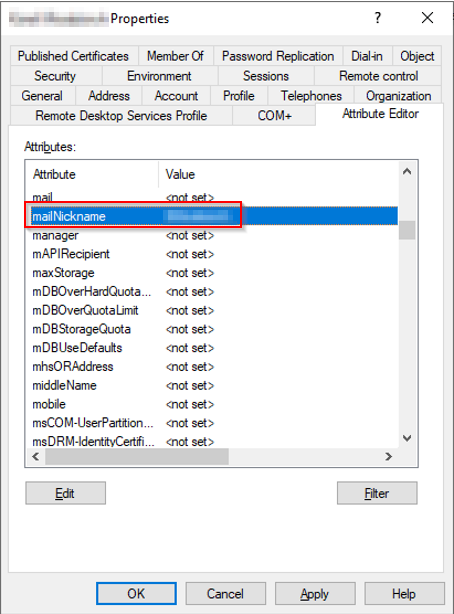
Attribute Editor - check the mailNickname has been set
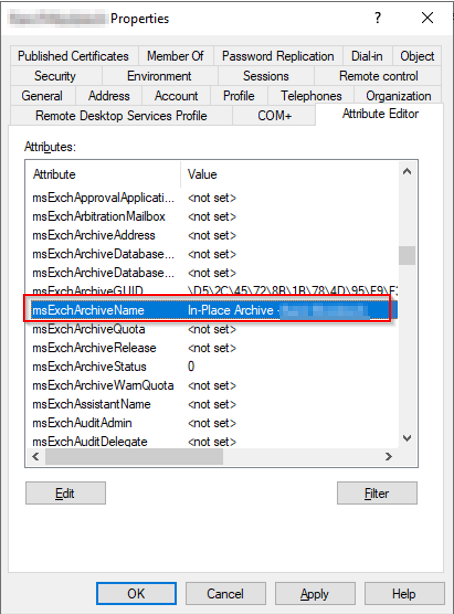
Edit msExchArchiveGUID and copy the hexadecimal value of the archive guid from step 2

Edit msExchArchiveName and copy the ArchiveName without the brackets from step 1
e.g. {In-Place Archive -Firstname Lastname}
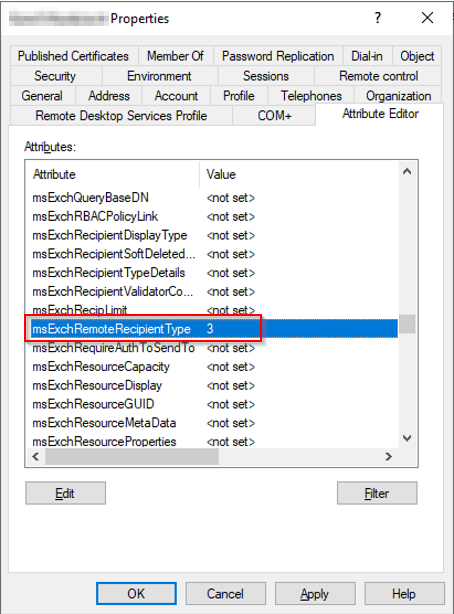
Edit msExchRemoteRecipientType and set the value to 3
Remote Recipient Type value 3 is ProvisionMailbox, ProvisionArchive
Run the following PowerShell command from your AD connect server to sync the changes to Office 365
Start-ADSyncSyncCycle -PolicyType Delta


Comments 1
Excellent this worked for me