You can help support this website by buying me a coffee!

SOLVED: Outlook saves .eml files with attachments to Inbox when opened (Outlook 2016, Microsoft 365 Apps for Enterprise)
You may also get this message:
The properties of the message have been changed. Want to save your changes to this message.
Troubleshooting: Disable all non-Microsoft Outlook add-ins
Disable any non-Microsoft Outlook add-ins
Open Outlook
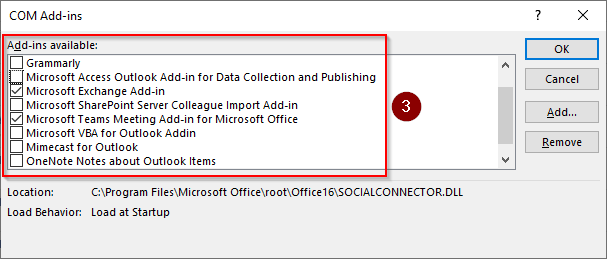
File - Options - Add-ins - Manage: COM Add-ins - Go

Untick all the Add-ins except these:
Microsoft Exchange Add-in
Microsoft Teams Meeting Add-in
Close and re-open Outlook and see if the issue still exists.
Then, re-enable the Add-ins one by one to try and identify the one that is causing the problem.
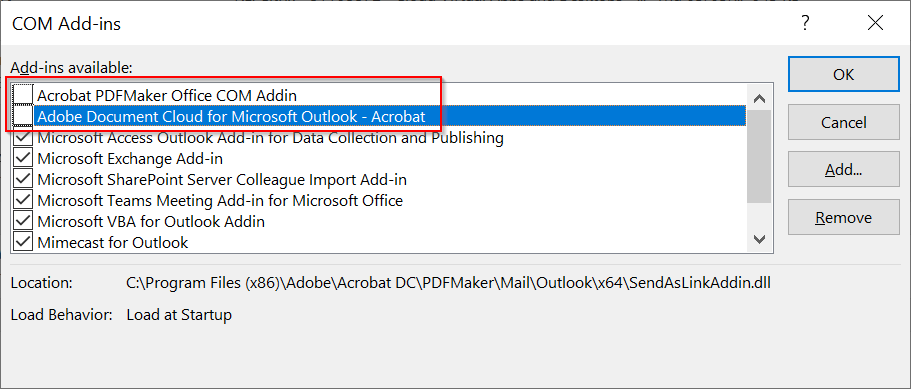
Solution: Disable Adobe Outlook Add-ins and ESET Antivirus Outlook Add-in
Untick these Add-ins:
Adobe PDFMaker Office COM Addin
Adobe Document Cloud for Microsoft Outlook
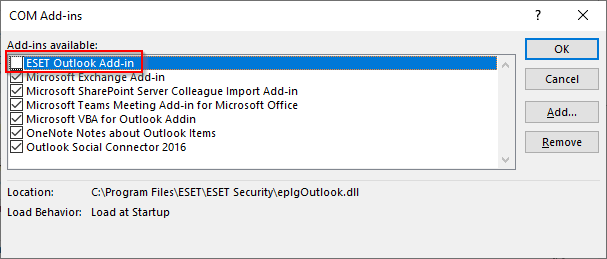
This issue can also occur when the ESET Endpoint Protection Outlook Add-in is enabled
Untick this Add-in:
ESET Outlook Add-in
Comments 1
Thank you! it was Adobe Document Cloud causing the problem for me. Once disabled its stopped copying emails into my inbox.